> ## Documentation Index
> Fetch the complete documentation index at: https://docs.getmeasure.com/llms.txt
> Use this file to discover all available pages before exploring further.
# Webhooks
Webhooks enable real-time updates from Measure to your application. Webhooks can be setup in the Measure dashboard by specifying a URL endpoint in your application to receive the relevant webhook payload when events you have subscribed to occur.
We currently use [Convoy Service](https://getconvoy.io/) to send webhooks to your servers.
## Full list of webhooks
Please take a look at the [Webhooks Reference](/webhook-references) for a full list of webhooks.
## Setting up webhooks
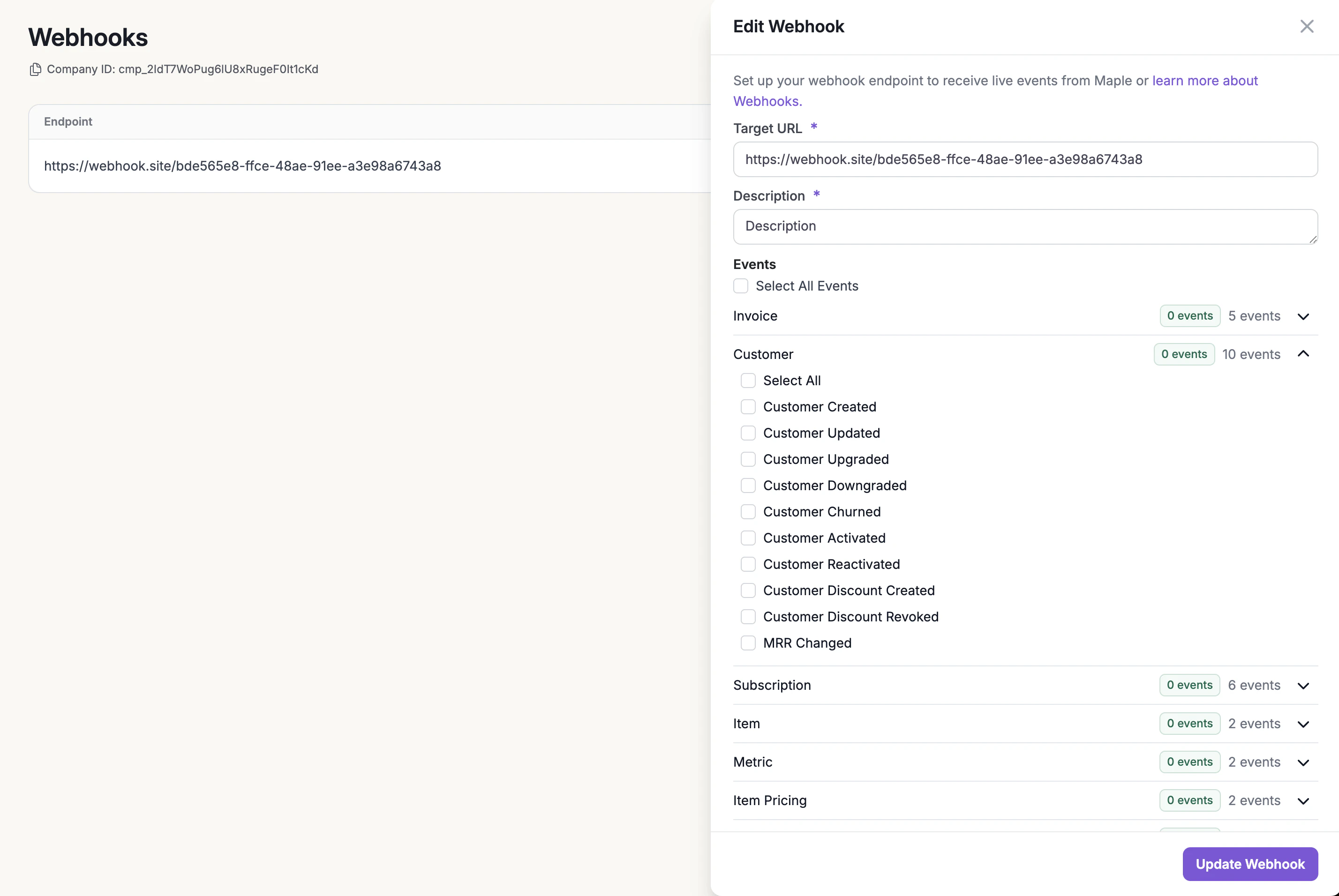
Webhooks can be enabled and configured through the Measure dashboard under the Developers section. You can subscribe to specific events or all events.
1. Go to the **Webhooks** sub-section under **Developers**.
2. Click on **New Webhook** button
3. Add a **Target URL**, **Description** and select the events you want to listen to. Then click **Add Webhook**
4. Copy the **secret**.
Once you create the webhook, a secret will be provided that can be used to verify the events received. Make sure to copy the secret since you will not be able to retrieve it again.
Once you set up a webhook, you can continue to subscribe to a number of webhook event types to perform actions in your application. We continue to add more webhook event types, so feel free to reach out to us if you need a specific webhook event type.
 ## Security
Measure will only send webhooks via a `POST` request to an HTTPS endpoint. Each request will also contain `X-Maple-Signature` header that represents the signature of the request. This signature can be verified to ensure that the webhook came from our servers, prevent replay attacks and ensure a zero downtime key rotation. See this [blog post](https://getconvoy.io/blog/generating-stripe-like-webhook-signatures/) for more details.
A sample header may look something like this:
```
X-Maple-Signature:
t=1492774577,
v1=ansdoj213e98jqd928u3eudh239eu2j9d2jd8ejd238eu23ei2d9j23e8u23eue3,
v0=6ffbb59b2300aae63f272406069a9788598b792a944a07aba816edb039989a39
```
## Receiving webhooks
### Verifying webhook signature
We recommend using [Convoy SDKs](https://docs.getconvoy.io/sdk/sdk) to verify the signature. They have support for a few common programming languages (Go, Ruby, Python, Javascript, PHP). The following code will verify the code and a `200`status code as the response
```bash Go theme={null}
func handleWebhook(w http.ResponseWriter, r *http.Request) {
body, err := io.ReadAll(r.Body)
webhooks := convoy.NewWebhook(
&convoy.WebhookOpts{
Secret: os.Getenv("WEBHOOKS_SECRET"),
Hash: "SHA512",
Encoding: convoy.Base64Encoding,
},
)
err = webhooks.VerifyPayload(body, r.Header.Get("X-Maple-Signature"))
if err != nil {
log.Errorf("webhooks not verified err = %s", err)
return
}
log.Debugf("received body: %s", body)
// Do something with the body
w.Header().Set("Content-Type", "application/json; charset=UTF-8")
w.WriteHeader(200)
}
```
```bash Javascript theme={null}
import { Webhook } from "convoy.js";
async function verifyWebhhok(req) {
try {
// ensure you are getting JSON and not text
const body: any = await req.json();
// Read signature from `X-Maple-Signature` header in the request
const signature = req.get("x-maple-signature") as string;
// Read secret from environment variable
const secret = "";
// verfiy an advanced signature
const webhook = new Webhook({
header: signature,
payload: body ,
secret: secret,
hash: "sha512",
encoding: "base64",
});
const verified = webhook.verify();
if (!verified) {
throw new Error("Invalid signature");
}
return true;
} catch (err) {
console.error("Error handling webhook:", err);
return false;
}
}
```
```bash Python theme={null}
from convoy.utils.webhook import Webhook
@router.post("/webhook/measure_billing")
async def handle_measure_billing_webhook(
request: Request,
) -> Response:
signature = request.headers.get("X-Maple-Signature")
body = await request.body()
webhook = Webhook(
secret=secret,
hash="SHA512",
encoding="base64",
)
try:
webhook.verify_signature(body.decode(), signature)
except Exception as e:
..
```
### Understanding webhook data
Your endpoint must be configured to read the webhook event object. Each event has a `event_type`, `created_at`, `data_type` and `data`.
```json theme={null}
{
event_type: "customer.updated",
data_type: "customer",
created_at: 1681498548,
data: {
object: {
id: "cus_2OQfabsJ8GIBwetfIRQLeCewrtBO",
...
}
}
}
```
### Responding to webhooks
Your endpoint must return a successful status code (`2XX`) within 30s. Measure webhooks have a built-in retry mechanism for any `non-2xx`(`3XX`,`4XX`, and `5XX`) status codes. They will be retried 10 times with an exponential backoff strategy.
## Security
Measure will only send webhooks via a `POST` request to an HTTPS endpoint. Each request will also contain `X-Maple-Signature` header that represents the signature of the request. This signature can be verified to ensure that the webhook came from our servers, prevent replay attacks and ensure a zero downtime key rotation. See this [blog post](https://getconvoy.io/blog/generating-stripe-like-webhook-signatures/) for more details.
A sample header may look something like this:
```
X-Maple-Signature:
t=1492774577,
v1=ansdoj213e98jqd928u3eudh239eu2j9d2jd8ejd238eu23ei2d9j23e8u23eue3,
v0=6ffbb59b2300aae63f272406069a9788598b792a944a07aba816edb039989a39
```
## Receiving webhooks
### Verifying webhook signature
We recommend using [Convoy SDKs](https://docs.getconvoy.io/sdk/sdk) to verify the signature. They have support for a few common programming languages (Go, Ruby, Python, Javascript, PHP). The following code will verify the code and a `200`status code as the response
```bash Go theme={null}
func handleWebhook(w http.ResponseWriter, r *http.Request) {
body, err := io.ReadAll(r.Body)
webhooks := convoy.NewWebhook(
&convoy.WebhookOpts{
Secret: os.Getenv("WEBHOOKS_SECRET"),
Hash: "SHA512",
Encoding: convoy.Base64Encoding,
},
)
err = webhooks.VerifyPayload(body, r.Header.Get("X-Maple-Signature"))
if err != nil {
log.Errorf("webhooks not verified err = %s", err)
return
}
log.Debugf("received body: %s", body)
// Do something with the body
w.Header().Set("Content-Type", "application/json; charset=UTF-8")
w.WriteHeader(200)
}
```
```bash Javascript theme={null}
import { Webhook } from "convoy.js";
async function verifyWebhhok(req) {
try {
// ensure you are getting JSON and not text
const body: any = await req.json();
// Read signature from `X-Maple-Signature` header in the request
const signature = req.get("x-maple-signature") as string;
// Read secret from environment variable
const secret = "";
// verfiy an advanced signature
const webhook = new Webhook({
header: signature,
payload: body ,
secret: secret,
hash: "sha512",
encoding: "base64",
});
const verified = webhook.verify();
if (!verified) {
throw new Error("Invalid signature");
}
return true;
} catch (err) {
console.error("Error handling webhook:", err);
return false;
}
}
```
```bash Python theme={null}
from convoy.utils.webhook import Webhook
@router.post("/webhook/measure_billing")
async def handle_measure_billing_webhook(
request: Request,
) -> Response:
signature = request.headers.get("X-Maple-Signature")
body = await request.body()
webhook = Webhook(
secret=secret,
hash="SHA512",
encoding="base64",
)
try:
webhook.verify_signature(body.decode(), signature)
except Exception as e:
..
```
### Understanding webhook data
Your endpoint must be configured to read the webhook event object. Each event has a `event_type`, `created_at`, `data_type` and `data`.
```json theme={null}
{
event_type: "customer.updated",
data_type: "customer",
created_at: 1681498548,
data: {
object: {
id: "cus_2OQfabsJ8GIBwetfIRQLeCewrtBO",
...
}
}
}
```
### Responding to webhooks
Your endpoint must return a successful status code (`2XX`) within 30s. Measure webhooks have a built-in retry mechanism for any `non-2xx`(`3XX`,`4XX`, and `5XX`) status codes. They will be retried 10 times with an exponential backoff strategy.